
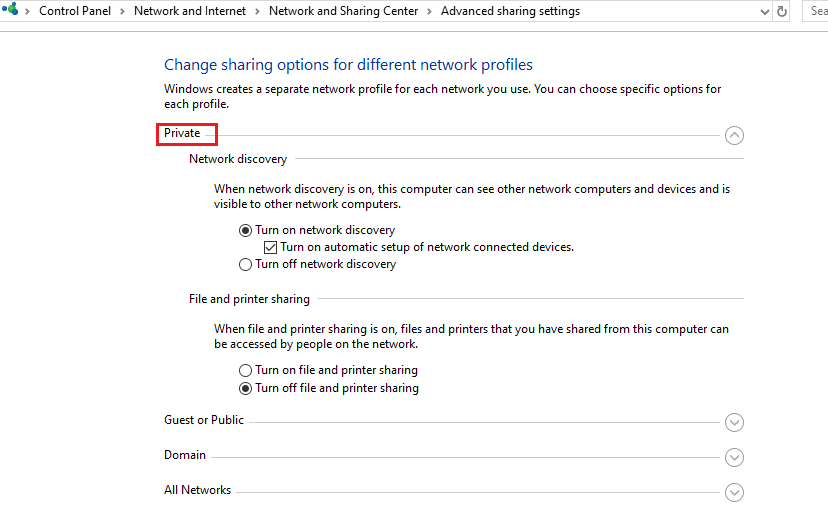
- You can open sharing options for different network profiles in Control Panel> Network and sharing center> Advanced sharing settings
——-If my answer is helpful to you, please remember to mark them as answer. Thank you!——
Hi,
In regards to your issue, here’re my suggestions:
You can use PowerShell command to change network settings from public to private: Run PS as administrater
Get-NetConnectionProfile2. Set-NetConnectionProfile -Name „NetworkName” -NetworkCategory Private. Replace NetworkName with the value of the Name field shared by the previous command.
To double check that the network location was changed, run the Get-NetConnectionProfile again and see the results. The NetworkCategory field should have a different value.
Set-NetConnectionProfile -Name "NetworkName" -NetworkCategory Private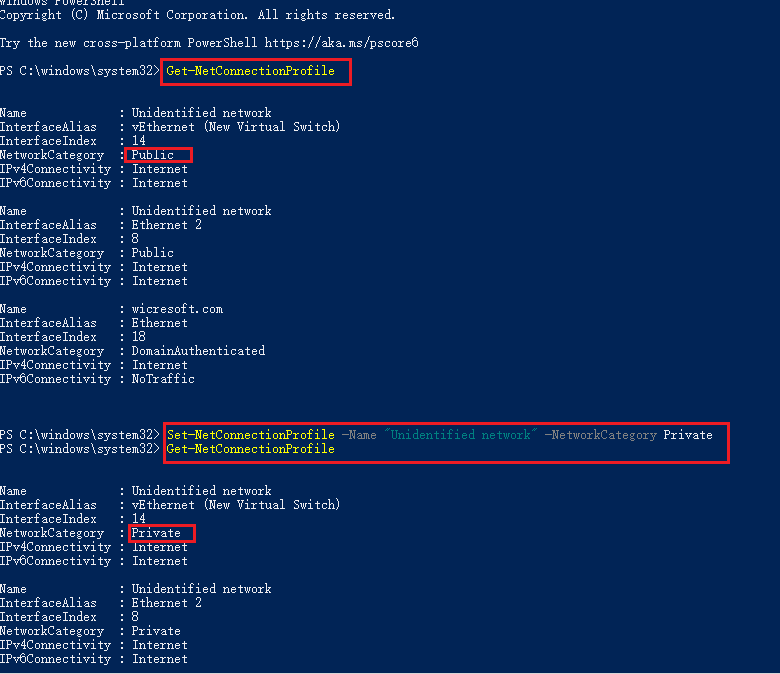
——-If my answer is helpful to you, please remember to mark them as answer. Thank you!——
Get-NetConnectionProfileSet-NetConnectionProfile -Name "NetworkName" -NetworkCategory PrivateGet-NetConnectionProfile -InterfaceAlias "Ethernet1" | Set-NetConnectionProfile -NetworkCategory Public
Get-NetConnectionProfile -InterfaceAlias "vEthernet (VLAN70_Kamery)" | Set-NetConnectionProfile -NetworkCategory Private
Set-NetConnectionProfile -InterfaceAlias "vEthernet (VLAN70_Kamery)" -NetworkCategory "Private"Get-NetConnectionProfile -InterfaceAlias „Ethernet1” | Set-NetConnectionProfile -NetworkCategory Public
Get-NetConnectionProfile -InterfaceAlias „vEthernet (VLAN70_Kamery)” | Set-NetConnectionProfile -NetworkCategory Private
Set-NetConnectionProfile -InterfaceAlias „vEthernet (VLAN70_Kamery)” -NetworkCategory „Private”